
Deploy and command Stellar tokens, NFTs, and DAOs through conversation.
Model Context Protocol backend that turns natural language into Stellar contract deployment, operations, and governance flows.



A Model Context Protocol (MCP) server that enables AI assistants to interact with the Stellar blockchain through natural language commands. The server provides comprehensive smart contract deployment, token operations, NFT management, governance execution, and registry tooling so builders can orchestrate Stellar dApps conversationally.
What It Does:
- Exposes 80+ blockchain operations as MCP tools
- Manages factory contract interactions (Token, NFT, Governance)
- Handles transaction building, simulation, and signing
- Generates merkle proofs for governance voting
- Provides contract deployment utilities and registry integration
What It Powers:
- AI chat interfaces (Cursor, Claude Desktop, VS Code)
- Natural language blockchain operations
- Automated contract deployment workflows
- Blockchain data queries through conversation
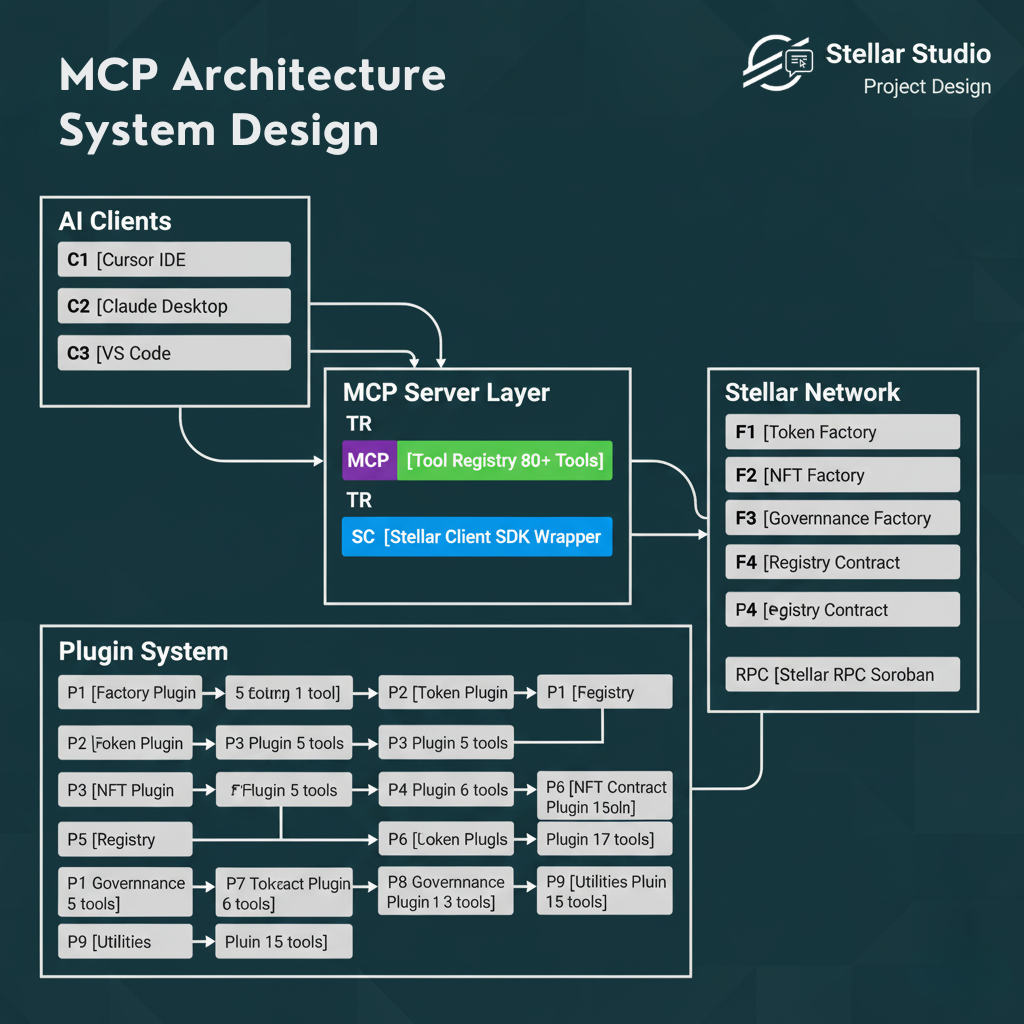
graph TB
    subgraph "AI Clients"
        C1[Cursor IDE]
        C2[Claude Desktop]
        C3[VS Code]
    end

    subgraph "MCP Server Layer"
        MCP[MCP Server Core]
        TR[Tool Registry<br/>80+ Tools]
        SC[Stellar Client<br/>SDK Wrapper]
    end

    subgraph "Plugin System"
        P1[Factory Plugin<br/>1 tool]
        P2[Token Plugin<br/>5 tools]
        P3[NFT Plugin<br/>5 tools]
        P4[Governance Plugin<br/>5 tools]
        P5[Registry Plugin<br/>6 tools]
        P6[Token Contract Plugin<br/>15 tools]
        P7[NFT Contract Plugin<br/>17 tools]
        P8[Governance Contract Plugin<br/>3 tools]
        P9[Utilities Plugin<br/>15 tools]
    end

    subgraph "Stellar Network"
        F1[Token Factory]
        F2[NFT Factory]
        F3[Governance Factory]
        F4[Registry Contract]
        RPC[Stellar RPC<br/>Soroban]
    end

    C1 & C2 & C3 --> MCP
    MCP --> TR
    TR --> P1 & P2 & P3 & P4 & P5 & P6 & P7 & P8 & P9
    P1 & P2 & P3 & P4 & P5 & P6 & P7 & P8 --> SC
    SC --> F1 & F2 & F3 & F4
    SC --> RPC

    style MCP fill:#7D00FF,color:#fff
    style TR fill:#4CAF50,color:#fff
    style SC fill:#2196F3,color:#fff
sequenceDiagram
    participant AI as AI Client
    participant MCP as MCP Server
    participant Plugin as Tool Plugin
    participant Stellar as Stellar SDK
    participant Network as Stellar Network

    AI->>MCP: Call token_deploy tool
    MCP->>Plugin: Route to TokenService
    Plugin->>Plugin: Validate parameters
    Plugin->>Stellar: Build transaction
    Stellar->>Network: Simulate transaction
    Network-->>Stellar: Gas estimate
    Stellar->>Network: Sign & submit
    Network-->>Stellar: Transaction hash
    Stellar-->>Plugin: Contract address
    Plugin-->>MCP: Success response
    MCP-->>AI: Tool result + suggestion
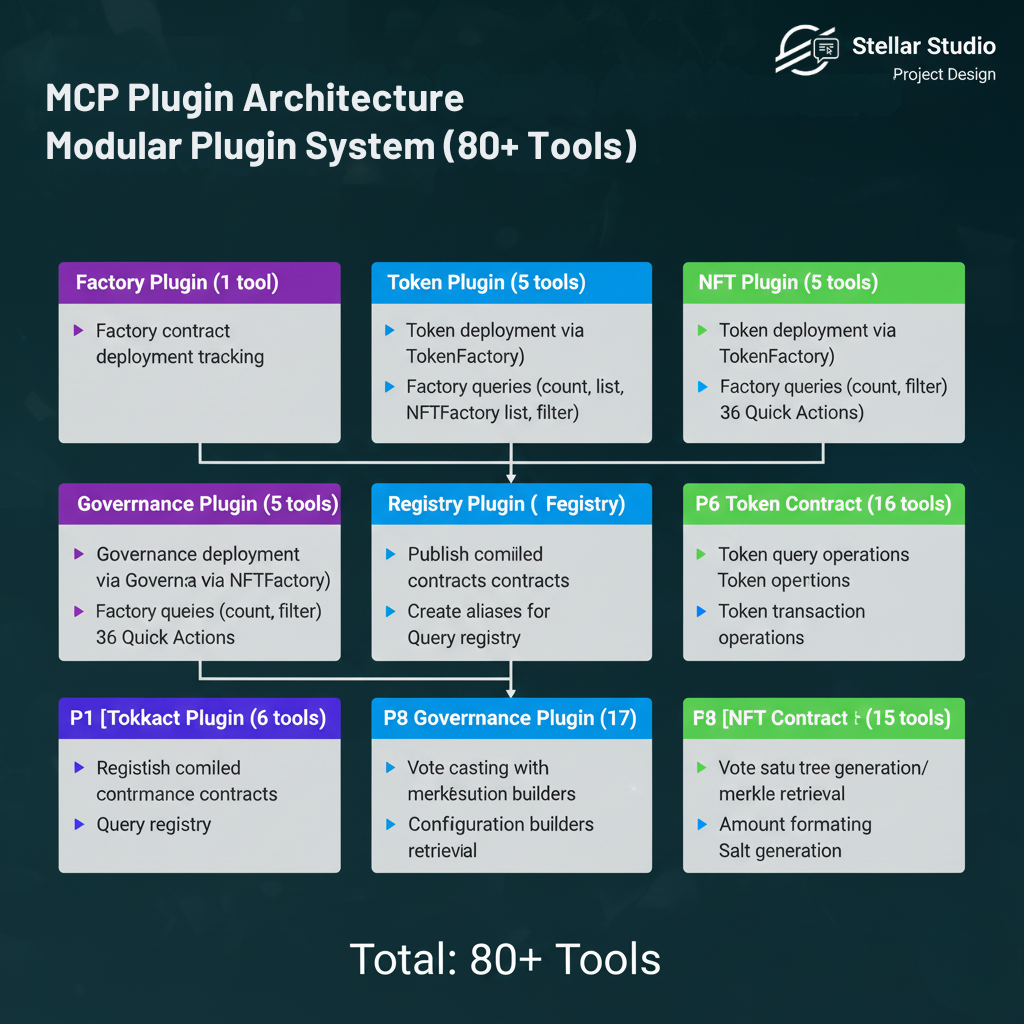
The server uses a modular plugin system for organizing tools by domain:
Factory Plugin (1 tool):
- Factory contract deployment tracking
Token Plugin (5 tools):
- Token deployment via TokenFactory
- Factory queries (count, list, filter by type/admin)
NFT Plugin (5 tools):
- NFT collection deployment via NFTFactory
- Factory queries (count, list, filter by type/owner)
Governance Plugin (5 tools):
- Governance deployment via GovernanceFactory
- Factory queries (count, list, filter by type/admin)
Registry Plugin (6 tools):
- Publish compiled contracts to Stellar Registry
- Deploy published contracts from registry
- Create aliases for deployed contracts
- Query registry for published contracts and versions
Token Contract Plugin (15 tools):
- Token query operations (name, symbol, balance, allowance, etc.)
- Token transaction operations (transfer, mint, burn, pause, etc.)
NFT Contract Plugin (17 tools):
- NFT query operations (owner, balance, metadata, etc.)
- NFT transaction operations (mint, transfer, burn, approve, etc.)
Governance Contract Plugin (3 tools):
- Vote casting with merkle proofs
- Vote status checking
- Vote results retrieval
Utilities Plugin (15 tools):
- Merkle tree generation and validation
- Configuration builders
- Address validation
- Amount formatting
- Salt generation
Total: 80+ Tools
- Token Factory: Deploy Pausable, Capped, Allowlist, Blocklist, or Vault tokens
- NFT Factory: Deploy Enumerable or AccessControl NFT collections
- Governance Factory: Deploy MerkleVoting governance contracts
- Registry Integration: Publish and deploy contracts through Stellar Registry
- Token Transfers: Native and fungible token operations
- Balance Queries: Real-time account balance monitoring
- Token Management: Minting, burning, pausing capabilities
- Approval System: Allowance and delegation management
- Collection Management: Complete NFT lifecycle operations
- Metadata Handling: Token URI and metadata management
- Transfer Operations: Secure ownership transfers
- Approval System: Individual and operator approvals
- Merkle Voting: Privacy-preserving vote casting
- Vote Tracking: Real-time vote status and results
- Proof Generation: Automatic merkle proof creation
- Contract Publishing: Publish compiled WASM to registry
- Version Management: Track and deploy specific versions
- Alias System: Create named references to contracts
- Discovery: List and query published contracts
- Merkle Trees: Generate complete merkle trees with proofs
- Validation: Address and configuration validation
- Builders: Quick configuration builders for common patterns
- Formatting: Amount conversion between human and contract formats
- Claude Desktop, Cursor, or VS Code with MCP support
- Node.js 18 or higher
- pnpm package manager
- Stellar account with funded balance (testnet or mainnet)
-
Clone and build the server
cd stellar-studio-mcp-server pnpm install pnpm build -
Configure environment variables
cp .env.testnet .env
# Edit .env with your Stellar secret key
Generate a Stellar secret key:
stellar keys generate my-key
stellar keys show my-key
-
Automated Setup (Recommended)
Use the automated setup script to configure your preferred AI application:
# Interactive mode - choose which application to configure
pnpm setup:claude

# Or configure specific applications
pnpm setup:cursor    # Configure Cursor editor
pnpm setup:code      # Configure VS Code

# Or use the script directly for multiple applications
./setup-mcp.sh --claude --cursor
The setup script will:
- Read your
.envconfiguration - Generate the appropriate MCP configuration
- Install it in the correct location for your chosen application(s)
- Provide restart instructions
- Read your
-
Manual Configuration (Alternative)
If you prefer manual setup, you can configure the applications directly:
Claude Desktop:
~/Library/Application Support/Claude/claude_desktop_config.jsonCursor Editor:
~/.cursor/mcp.jsonVS Code:
~/Library/Application Support/Code/User/mcp.jsonExample configuration:
{ "mcpServers": { "stellar-studio": { "command": "node", "args": ["/absolute/path/to/stellar-studio-mcp-server/dist/index.js"], "env": { "STELLAR_SECRET_KEY": "SD...", "STELLAR_NETWORK": "testnet" } } } } -
Restart your AI application
Close and reopen Claude Desktop, Cursor, or VS Code to load the MCP server.
| Variable | Required | Description |
|---|---|---|
STELLAR_SECRET_KEY |
Yes | Your Stellar secret key (starts with SD) |
STELLAR_NETWORK |
Yes | Network: local, testnet, or mainnet |
TOKEN_FACTORY |
Auto | Token factory contract address (auto-configured) |
NFT_FACTORY |
Auto | NFT factory contract address (auto-configured) |
GOVERNANCE_FACTORY |
Auto | Governance factory contract address (auto-configured) |
Factory Addresses (Testnet):
TOKEN_FACTORY=CAHLJEQUCNTV7JPAPCMLCBIHOX7FFB57DUARJ6XGTW27FPCVKKY7JM2A
NFT_FACTORY=CDJQAGTVOK37NPBWMADBJDGFYM6BEAFV4T45S23D4LQLGSTMRRZ5RQ6X
GOVERNANCE_FACTORY=CC3SLHSCJHP7YJ462ZIACJ54VOHL5ZFUODZKBTITIZSO74D4YOPR5WCE# Switch to testnet
cp .env.testnet .env
pnpm build
./setup-mcp.sh --claude
# Switch to local development
cp .env.local .env
pnpm build
./setup-mcp.sh --claude"Deploy a new token named MyToken with symbol MTK and 1 million initial supply"
"Get the balance of my MTK tokens"
"Transfer 1000 MTK tokens to GA2C..."
"Mint 50000 MTK tokens to my address"
"Get all deployed tokens from the factory"
"Show me all Pausable tokens"
"Deploy a new NFT collection called CoolNFTs with symbol COOL"
"Mint an NFT in my collection at CA..."
"Transfer NFT #5 from my collection to GB..."
"Get all my NFTs"
"Show me all NFT collections I own"
"Deploy a governance contract with voters: GA..., GB..., GC..."
"Cast a vote for proposal with my merkle proof"
"Check if address GA... has voted"
"Get the current vote results"
"Publish my compiled token contract to the registry"
"Deploy version 1.0.0 of my-token from the registry"
"Create an alias for my deployed contract"
"Show me all published contracts"
"Get the current version of my-token contract"
"Generate a merkle tree for addresses: GA..., GB..., GC..."
"Validate this Stellar address: GA..."
"Generate a random salt for deployment"
"Format 100 tokens with 7 decimals"
"Build a token configuration for a capped token"
Factory Tools (1):
factory_get_deployed- Get all deployed factory contracts
Token Deployment & Queries (5):
token_deploy- Deploy new token via TokenFactorytoken_get_deployed- List all deployed tokenstoken_get_by_type- Filter tokens by type (Pausable, Capped, etc.)token_get_by_admin- Filter tokens by admin addresstoken_get_count- Get total token deployment count
NFT Deployment & Queries (5):
nft_deploy- Deploy new NFT collection via NFTFactorynft_get_deployed- List all deployed NFT collectionsnft_get_by_type- Filter NFTs by type (Enumerable, AccessControl)nft_get_by_owner- Filter NFTs by owner addressnft_get_count- Get total NFT deployment count
Governance Deployment & Queries (5):
governance_deploy- Deploy governance contract via GovernanceFactorygovernance_get_deployed- List all deployed governance contractsgovernance_get_by_type- Filter governance by type (MerkleVoting)governance_get_by_admin- Filter governance by admin addressgovernance_get_count- Get total governance deployment count
Registry Tools (6):
registry_publish- Publish compiled contract to Stellar Registryregistry_deploy- Deploy published contract from registryregistry_create_alias- Create alias for deployed contractregistry_list_published- List all published contracts (note: limited support)registry_get_versions- Get current version for a contractregistry_info- Get information for specific published contract
Token Contract Operations (15):
- Query (7 tools): name, symbol, decimals, total_supply, balance, allowance, paused
- Transactions (8 tools): transfer, transfer_from, approve, mint, burn, burn_from, pause, unpause
NFT Contract Operations (17):
- Query (10 tools): name, symbol, balance, owner_of, get_approved, is_approved_for_all, token_uri, total_supply, get_owner_token_id, get_token_id
- Transactions (7 tools): mint, transfer, transfer_from, approve, approve_for_all, burn, burn_from
Governance Contract Operations (3):
governance_contract_vote- Cast vote with merkle proofgovernance_contract_has_voted- Check if address has votedgovernance_contract_get_vote_results- Get vote tallies
Utility Tools (15):
- Merkle:
createMerkleRoot,buildMerkleTree - Validation:
validateAddress,validateTokenConfig,validateGovernanceConfig - Builders:
buildTokenConfig,buildNFTConfig,buildGovernanceConfig,buildMerkleVoting,buildCappedToken,buildSimpleToken,buildMultisig - Formatting:
formatTokenAmount,parseTokenAmount - Generation:
generateSalt,generateMultipleSalts
stellar-studio-mcp-server/
├── src/
│   ├── core/                        # MCP core functionality
│   │   ├── Tool.decorator.ts        # @Tool decorator
│   │   ├── Option.ts                # Stellar Option type helpers
│   │   └── WalletClientBase.ts      # Base wallet client
│   │
│   ├── clients/                     # Contract client wrappers
│   │   ├── TokenFactoryClient.ts
│   │   ├── NFTFactoryClient.ts
│   │   ├── GovernanceFactoryClient.ts
│   │   └── RegistryClient.ts
│   │
│   ├── plugins/                     # Tool plugins
│   │   ├── factory/                 # Factory tracking
│   │   ├── token/                   # Token deployment
│   │   ├── nft/                     # NFT deployment
│   │   ├── governance/              # Governance deployment
│   │   ├── registry/                # Registry operations
│   │   ├── token-contract/          # Token contract operations
│   │   ├── nft-contract/            # NFT contract operations
│   │   ├── governance-contract/     # Governance contract operations
│   │   └── utilities/               # Utility tools
│   │
│   ├── utils/                       # Shared utilities
│   │   ├── merkle.ts                # Merkle tree generation
│   │   ├── validation.ts            # Parameter validation
│   │   ├── builders.ts              # Configuration builders
│   │   └── salt.ts                  # Salt generation
│   │
│   ├── registry/                    # Contract address registry
│   │   └── addresses.ts             # Network-specific addresses
│   │
│   └── index.ts                     # MCP server entry point
│
├── packages/                        # Generated Stellar SDK packages
│   ├── token_factory/
│   ├── nft_factory/
│   ├── governance_factory/
│   └── .../
│
├── dist/                            # Built output
├── setup-mcp.sh                     # Automated setup script
├── .env.testnet                     # Testnet configuration template
├── .env.local                       # Local network configuration template
├── tsconfig.json                    # TypeScript configuration
└── tsup.config.ts                   # Build configuration
// 1. Create service class in src/plugins/my-plugin/
export class MyService {
  @Tool({
    name: 'my_operation',
    description: 'Performs custom operation'
  })
  async myOperation(
    client: StellarClient,
    params: MyParams
  ): Promise<ToolResult> {
    // Implementation
    return {
      success: true,
      data: result,
      suggestion: 'Operation completed successfully'
    };
  }
}

// 2. Register in src/index.ts
import { MyService } from './plugins/my-plugin/my.service';
server.registerTools(new MyService());# Development build with watch
pnpm dev
# Production build
pnpm build
# Type checking
pnpm typecheck
# Start server
pnpm start# Test setup for Claude Desktop
pnpm setup:claude
# Test setup for Cursor
pnpm setup:cursor
# Test setup for VS Code
pnpm setup:code
# Or use the script directly
./setup-mcp.sh --help# Build the server
pnpm build
# Test with Claude Desktop
# Tools should appear automatically after restart
# Test specific tool by asking:
# "Deploy a test token named TestToken with symbol TST"All 80+ MCP tools have been implemented and tested on Stellar testnet, including:
- ✅ Factory deployment tracking
- ✅ Token deployment and queries
- ✅ NFT deployment and queries
- ✅ Governance deployment and queries
- ✅ Registry publishing and deployment
- ✅ Token contract operations (15 tools)
- ✅ NFT contract operations (17 tools)
- ✅ Governance contract operations (3 tools)
- ✅ Utility functions (15 tools)
- Store secret keys securely using environment variables
- Never commit credentials to version control
- Use testnet for development and testing
- Verify all transaction details before execution
- Use official RPC endpoints for blockchain connections
- Verify smart contract addresses before interaction
- Monitor transaction fees and network congestion
- Implement proper error handling and logging
- All transactions are simulated before submission
- User must authorize with wallet secret key
- Parameter validation before execution
- Address format verification
Core blockchain operations using official Stellar JavaScript SDK with support for Soroban smart contracts, transaction creation, signing, and broadcasting.
TypeScript clients auto-generated from Soroban contracts using stellar contract bindings typescript, providing type-safe contract interactions.
Standardized AI-to-tool integration protocol enabling natural language interaction with blockchain operations across multiple AI clients.
Tools not appearing in AI client
- Restart the AI application after configuration changes
- Verify absolute paths in MCP configuration file
- Check that server built successfully (
pnpm build) - Verify environment variables are set correctly
Invalid address format errors
- Ensure Stellar addresses start with G (account) or C (contract)
- Use proper address format for network (testnet vs mainnet)
- Verify addresses are for the correct network
Insufficient balance errors
- Check XLM balance for transaction fees
- Verify token balances before transfers
- Consider network congestion effects on fees
Network connectivity issues
- Verify RPC endpoint accessibility
- Check network configuration in
.env - Test alternative network endpoints
- Ensure correct network selected (local/testnet/mainnet)
Setup script errors
- Ensure
.envfile exists before running setup - Verify project is built (
pnpm build) - Check Node.js is in PATH
- Run with
--helpflag for usage information
Enable detailed logging:
export DEBUG=true
pnpm devDocumentation:
- CONTRACT_INTERACTIONS_SPEC.md - Detailed tool specifications
- Main Repository README - Stellar Studio ecosystem overview
Related Projects:
- Stellar Studio Contracts - Smart contract source code
- Stellar Studio Frontend - Web interface (coming soon)
External Links:
- Model Context Protocol - MCP specification
- Stellar SDK - JavaScript SDK documentation
- Soroban Documentation - Smart contract guide
- Stellar Laboratory - Network explorer and testing tools
This project demonstrates AI-blockchain integration patterns and welcomes contributions. Please follow these guidelines:
- Fork the repository and create feature branches
- Follow TypeScript coding standards and conventions
- Add comprehensive tests for new functionality
- Update documentation for API changes
- Submit pull requests with detailed descriptions
MIT License - see LICENSE file for complete terms and conditions.
Stellar Studio MCP Server - Bridging artificial intelligence with Stellar blockchain through natural language interactions.
Built with TypeScript, MCP, and Stellar SDK for Soroban smart contracts.