

A self-hosted web app for searching and browsing iMessage exports generated by imessage-exporter. Runs entirely in Docker, stores a deduplicated SQLite index, and serves a paginated chat interface with full-text search and semantic image search.
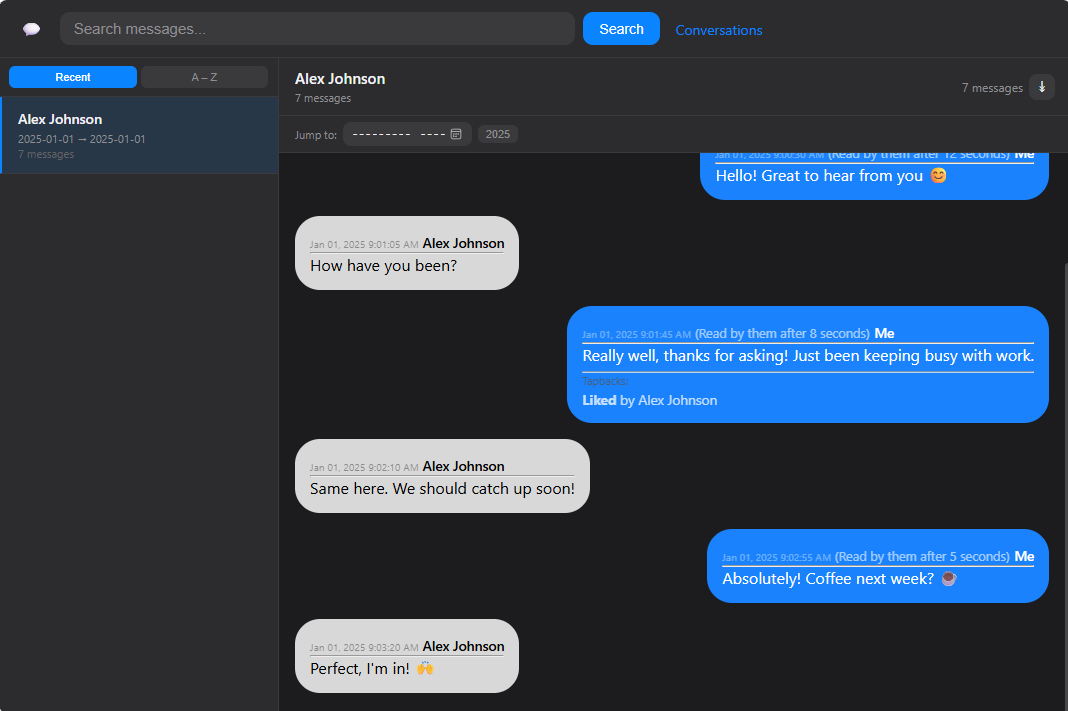
- Full-text search across all conversations with porter stemming and prefix matching (
tacofindstacos) - Semantic image search — search your photos and attachments with natural language (
"dog at the beach","birthday cake","screenshot") powered by MobileCLIP-S0 running entirely on CPU - Virtual scroll — conversations with tens of thousands of messages scroll smoothly without pagination UI
- Inline reply previews — tapbacks, threaded replies, and edited messages render faithfully from the original exporter HTML
- Multi-archive deduplication — index multiple export snapshots without duplicate messages
- HEIC/HEIF support — iPhone photos converted to JPEG on the fly for browser display
- Name resolution — phone numbers resolved to contact names across group chats
- Reply navigation — ⇱ / ⇲ arrows jump between a reply and its parent message
- Search result highlighting — clicking a result jumps directly to the message with a yellow highlight
- imessage-exporter output directory (one or more export snapshots)
- Docker and Docker Compose
- CPU-only system is sufficient — no GPU required
-
Clone the repository:
git clone https://github.com/mbaran5/imessage-exporter-viewer.git cd imessage-exporter-viewer -
Edit
compose.yamlto point at your export directory:volumes: - /path/to/your/imessage_exports:/archives:ro - imessage_db:/data
-
Start the stack:
docker compose up -d
The indexer runs automatically on every container start. On first run it will parse and index all exports — this may take a few minutes depending on archive size. Subsequent starts are fast as messages are deduplicated by GUID.
Pre-built images are available on Docker Hub:
# Stable release
docker pull mbaran5/imessage-exporter-viewer:latest
# Image search branch
docker pull mbaran5/imessage-exporter-viewer:image-searchservices:
imessage-exporter-viewer:
image: mbaran5/imessage-exporter-viewer:image-search
container_name: imessage-exporter-viewer
ports:
- "6333:6333"
volumes:
  - /path/to/your/imessage_exports:/archives:ro
  - imessage_db:/data
environment:
- ARCHIVE_ROOT=/archives
- DB_PATH=/data/imessage.db
restart: unless-stopped
volumes:
imessage_db:# Install PyTorch (CPU) first
pip install torch torchvision --index-url https://download.pytorch.org/whl/cpu
# Install ml-mobileclip from GitHub and remaining deps
pip install git+https://github.com/apple/ml-mobileclip.git
pip install -r requirements.txt
export ARCHIVE_ROOT=/path/to/imessage_exports
export DB_PATH=/path/to/imessage.db
python3 indexer.py # text indexing (fast)
python3 indexer.py embed # image embedding (slow on first run, then incremental)
python3 app.pyClicking the Images button in the search bar opens the image search interface. Type any natural language description and the app returns matching photos and attachments ranked by visual similarity.
- On first container start, after text indexing completes, the image embedder runs in the background
- Each image attachment is encoded into a 512-dimensional embedding vector using MobileCLIP-S0 and stored in the SQLite database
- At search time the text query is encoded with the same model and compared against all stored embeddings via cosine similarity
- Results above a 0.15 similarity threshold are returned, sorted by relevance, paginated 100 per page
Image embedding is CPU-bound. Rough estimates at batch size 32:
| Collection size | Approximate time |
|---|---|
| 5,000 images | ~10 minutes |
| 20,000 images | ~45 minutes |
| 50,000 images | ~2 hours |
The web server starts immediately after text indexing completes — you do not need to wait for image embedding to finish before using the app. Image search results will appear progressively as embedding catches up. The ~30 MB MobileCLIP-S0 model weights are downloaded from Apple's CDN on first use and cached in the MODEL_DIR volume.
Embedding is incremental: restarting the container only processes images that have not yet been embedded.
Install imessage-exporter and run:
imessage-exporter -f html -o ~/imessage_exportsPoint ARCHIVE_ROOT at the output directory. You can export multiple times over the years and point them all at the same ARCHIVE_ROOT subdirectory — the indexer will deduplicate across snapshots.
The indexer auto-discovers export directories. Supported layouts:
/archives/                          # single export at root
/archives/export-2023/              # multiple exports as subdirectories
/archives/exports/2023/             # one level deeper
Each discovered directory must contain at least one .html file and an attachments/ subdirectory.
| Variable | Default | Description |
|---|---|---|
ARCHIVE_ROOT |
/archives |
Root directory containing iMessage HTML exports |
DB_PATH |
/data/imessage.db |
Path to the SQLite database |
MODEL_DIR |
/data/models |
Directory where the MobileCLIP-S0 checkpoint is cached |
- Large conversations (40MB+ HTML files) are handled via virtual scrolling — only ~150 messages are in the DOM at a time
- HEIC images are converted to JPEG on the fly; this requires
libheif-dev(included in the Docker image) - The FTS index uses the SQLite porter stemmer, so text searches are stemmed and prefix-matched automatically
- Re-running the indexer is safe and idempotent — existing messages are not duplicated
- Image embeddings are stored in the same SQLite database as messages; at ~2 KB per image, 50,000 images adds roughly 100 MB to the database
- Image search quality is best for concrete subjects (
"dog","food","ocean sunset"); abstract or text-heavy queries work less reliably
MIT — see LICENSE