
A modern rewrite of the original Angular/Electron Dashboard, rebuilt from scratch with pure vanilla JavaScript and Electron 45. No Angular, no React, no build step required for development.
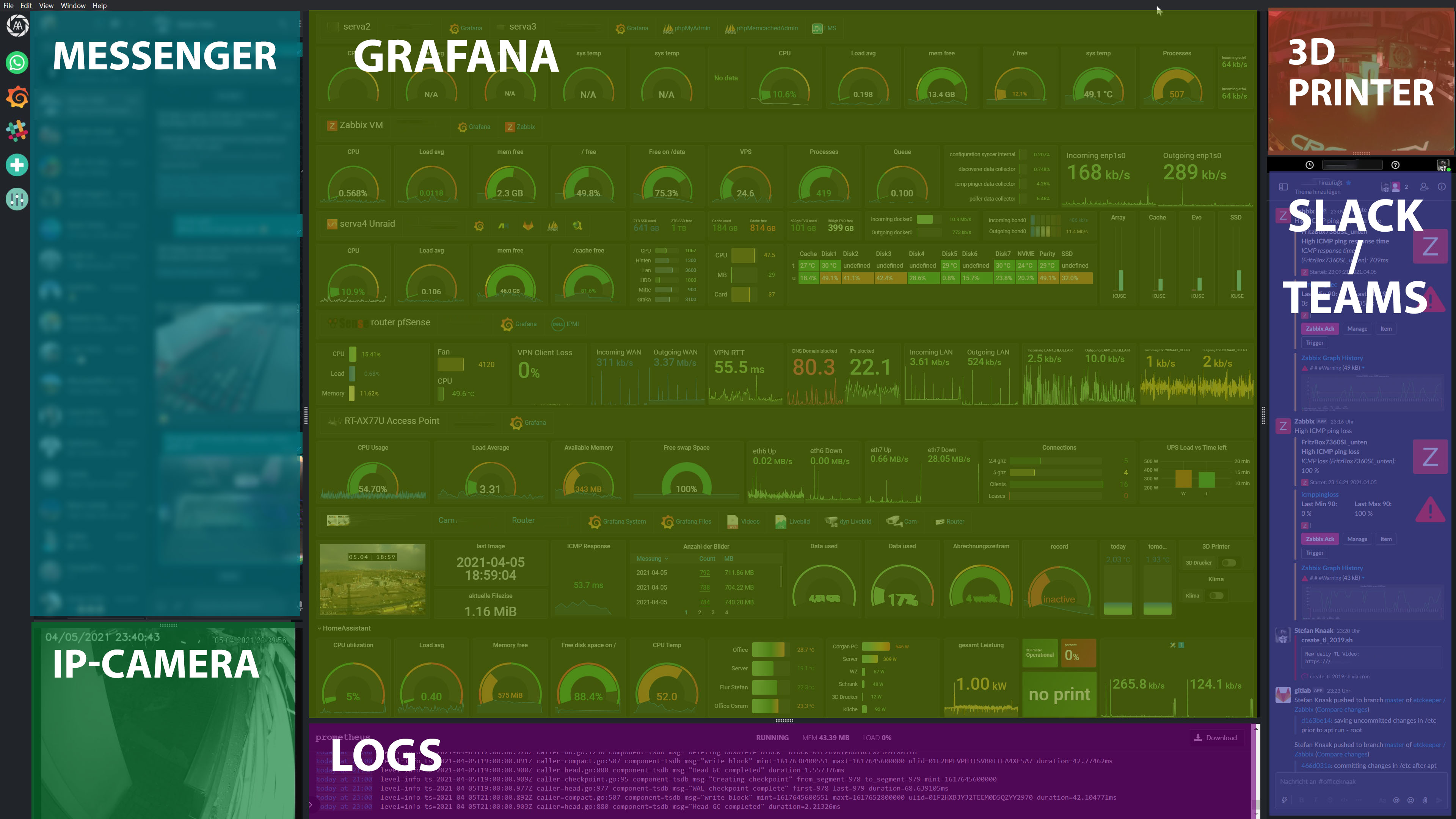
Display any website in a fully resizable multi-panel layout. It is designed for IT professionals who want a single-window overview of their tools, such as Grafana, Slack, WhatsApp, Jira and GitHub.
-
3-column × 2-row grid: up to 6 panels, all resizable via drag handles (Split.js)
-
Per-panel position config: assign each panel to a specific column (1–3) and row (1–2) via the UI
-
Sidebar: one icon or button per panel, click to toggle visibility
-
Custom icons: panels support individual icon images in the sidebar
-
Dark and light mode: switchable via Settings
-
Custom CSS injection: inject CSS into any webview after page load
-
Persistent config: layout, sizes and panel URLs are saved automatically to disk
-
Add, edit and delete panels: full panel management via the Manage Panels modal
-
Chrome user agent: all webviews identify as Chrome 146 for maximum site compatibility
-
External links: new-window and popup links to other sites open in the system default browser
-
Panels stay loaded: hiding or showing one panel does not reload the others
-
Auto-reload: each web panel reloads every 6 hours by default (adjustable per panel, 0 = never); a panel you are typing in waits
-
Window position: the window reopens on the monitor and at the size it was closed
-
Passwords hidden: a password in a panel URL (
rtsp://user:pass@host) shows as••• -
Portable build: a zip that keeps its settings in a
datafolder next to the exe -
RTSP camera streams via go2rtc, WebRTC into the panel
- Each app release pins a go2rtc version (
go2rtcVersioninpackage.json); it is downloaded from GitHub on first use and again whenever a release pins a newer one - Picture straight from go2rtc's RTSP client; while a camera's sound is on,
ffmpeg:{url}#video=copy#audio=opusadds AAC→Opus transcoding - Dynamic port allocation for go2rtc API/RTSP/WebRTC ports
- Audio toggle button on camera panels (click to mute or unmute)
- Volume control via mouse wheel on audio icon (10% steps, shows % label briefly)
- Each app release pins a go2rtc version (
-
Menu bar hidden by default; right-click context menu exposes DevTools, reload, zoom, cache clear
-
Config saved to userData via IPC (load/save/delete)
Download the latest release from the Releases page:
- Windows installer:
IT-Dashboard-Setup-<version>.exe, run it. - Windows portable:
IT-Dashboard-<version>-portable.zip, unzip anywhere and startIT Dashboard.exe. Settings and logins stay in thedatafolder next to it. Delete that folder to use the settings of an installed copy instead. - Linux:
IT-Dashboard-<version>-x86_64.AppImage - macOS:
IT-Dashboard-<version>-arm64.dmg
No Node.js or any other dependency required. The Electron runtime and everything needed is bundled.
| Tool | Version |
|---|---|
| Node.js | 22.12+ (Electron 45) |
| npm | 10+ |
git clone https://github.com/corgan2222/Dashboard.git
cd Dashboard
npm installnpm start
node_modules/is excluded from git but is recreated locally bynpm install. On Windows, ifnpm startfails to find Electron, you can launch the binary directly (it exists afternpm install):node_modules\electron\dist\electron.exe .
Bump version in package.json on master, then push a matching tag. GitHub builds all three platforms and creates a release with the files attached:
git tag v2.1.1
git push origin v2.1.1
The workflow (.github/workflows/release.yml) runs three parallel jobs on windows-latest, ubuntu-latest and macos-latest and publishes the result to the GitHub Releases page. The release notes come from the Release Drafter draft, sorted by pull request labels.
You can also trigger it manually from GitHub → Actions → Build & Release → Run workflow.
# Windows (NSIS installer, x64)
npm run build:win

# Windows portable zip
npm run build:portable

# Linux (AppImage)
npm run build:linux

# macOS (DMG)
npm run build:mac
Output is placed in the dist/ folder.
The dashboard config is saved automatically at:
| Platform | Path |
|---|---|
| Windows | %APPDATA%\it-dashboard\dashboard-config.json |
| Linux | ~/.config/it-dashboard/dashboard-config.json |
| macOS | ~/Library/Application Support/it-dashboard/dashboard-config.json |
| Portable | data\dashboard-config.json next to the exe |
Each panel entry in the config supports:
| Field | Type | Description |
|---|---|---|
name |
string | Display name |
site |
string | URL to load in the webview |
col |
1–3 | Which column to place this panel in |
row |
1–2 | Which row within the column |
visible |
bool | Whether the panel is shown |
size |
number | Percentage size within its column (set by drag) |
icon |
string | Optional path to sidebar icon image |
reloadHours |
number | Hours between automatic reloads; 0 = never, default 6 |
To reset to defaults, use Settings → Reset to Default inside the app, or delete the config file.
| Component | Technology |
|---|---|
| Shell | Electron 45 |
| UI | Vanilla JavaScript (no framework) |
| Layout | Split.js 1.6.5 |
| Styling | CSS custom properties (dark/light theme) |
| Persistence | JSON file via Electron IPC |
| Webviews | Electron <webview> tag |
| Cameras | go2rtc (RTSP to WebRTC), ffmpeg for sound |
.
├── main.js          # Electron main process, window, webview hooks, go2rtc, IPC handlers
├── preload.js       # Context bridge (exposes safe APIs to renderer)
├── index.html       # App shell: sidebar, modals, layout
├── renderer.js      # All UI logic, Split.js, panel rendering, camera streams
├── styles.css       # CSS custom-property theming
├── assets/          # Icons and images
├── scripts/         # make-portable.ps1 packs the portable zip
└── package.json     # Dependencies, go2rtc version and electron-builder config
- Max 3 columns, max 2 rows per column (6 panels total)
- Some sites block embedding in webviews (X-Frame-Options or CSP). This is a site restriction, not an app bug.
Original project: corgan2222/Dashboard (Angular + Electron) This version is a clean rewrite using vanilla JS and Electron 45.