

Español · English
Run NAM A2 Lite inside your POD Go, and change captures over USB without reinstalling firmware for each model. One Windows app provides Firmware and recovery and a NAM Library, with Spanish and English interfaces.
The test status is listed in validation.
Already using custom v8? Download the new EXE and use NAM Library. There is no firmware reinstall for this update.
0.8.6 fixes intermittent “Incomplete response” errors when editing NAM volume or refreshing the library. Verified volume changes are retained even if a later refresh fails. See the release notes.
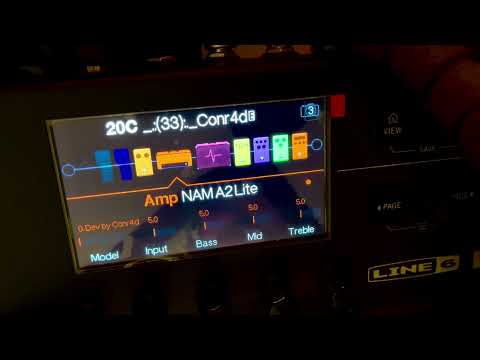
NAM A2 Lite running directly inside a Line 6 POD Go.
Make a backup in POD Go Edit first and keep its .pgb file. Install the
official POD Go driver, then close POD Go Edit and other Line 6 applications.
The CF NAM Conr4d is included. You do not need an original HXF to install it.
Open Manager; it starts on Firmware and recovery:
- Connect POD Go in normal startup mode.
- Choose CF NAM Conr4d (included) and Load your backup (.pgb)….
- Click Install NAM firmware, read the backup reminder and confirm OK.
Wait for the final result and normal startup before checking audio. This is a full firmware transfer and takes substantially longer than uploading a NAM. There is no automatic installation when opening the app.
How long does it take? User reports suggest that the wait can increase with the number of IRs stored on the POD Go and included in its backup. One user reported completing installation in 5–10 minutes; this is a reference, not a guaranteed duration. Keep the pedalboard connected and wait for the final result.
Complete instructions: Quick start · FAQ.

Offline interface preview; the current hardware-validation status is listed below.
With custom firmware installed and the library connected:
- Open NAM… — choose your capture.
- Choose a Model slot — empty slots and existing NAMs are clearly marked.
- Upload to Model… — wait for upload and full readback verification.
Select that Model in the NAM A2 Lite amp block on the pedalboard. You can then disconnect the computer: the POD Go processes the audio itself.
Use the short name field for a Model value such as 53. FRIEDMAN HBE. Existing
captures uploaded with older Manager versions need uploading again to add a
name. An occupied slot offers Replace Model…, followed by confirmation and a
verified backup. Cabinet IRs are protected.
There is one Volume (dB) control with Automatic. Automatic runs a short, local test through the capture and compares its volume with Developed by Conr4d at −5 dB. It adjusts volume while preserving the model's saturation. Uncheck Automatic to set the volume yourself. The source NAM file stays unchanged.
Select a stored NAM and choose Edit volume… to update its volume in the same Model, or Delete NAM… to free the slot. Both keep a backup and verify the result. Model 0 and cabinet IRs are protected. Deleting a NAM means presets using that Model will no longer find it. Volume editing needs the levels saved on this PC; if unavailable, open the original NAM and upload it again.

Version 0.8.6 keeps its normal size on large screens, scales proportionally when space is limited, and supports maximizing. Very small windows use scrolling to keep controls readable. Updating Manager does not require reinstalling the included v8 custom firmware.
| Item | Meaning |
|---|---|
| Model 0 | Built-in, read-only 0. Dev by Conr4d; capture by conr4daudio |
| Model 1–128 | The corresponding user IR slot; NAMs and cabinet IRs share this bank |
| Model knob | Shows the number and short name above Model; the title stays Amp NAM A2 Lite |
| Cab/IR block | Separate from NAM; keep it enabled or bypass it as usual |
The amp model replaces Line 6 Clarity. Compatible captures are A2 Lite, 3 channels, 1,871 weights, 48 kHz, including a SlimmableContainer with that submodel. Other NAM architectures are rejected with an explanation.
Uploading data is possible with official firmware, too; NAM playback requires custom firmware. A successful upload confirms stored data, not an installed CF. The app does not yet reliably identify official versus custom firmware over USB.
This port targets the standard POD Go, base 2.50. Wireless and other Line 6 models are not claimed as supported. Installing this firmware does not implement the separate AMP OUT / cabinet routing modification.
Choose Load Official Firmware… and provide the exact original POD Go 2.50 HXF. After restoring it, load your backup in POD Go Edit to restore your previous presets, including presets that had used the NAM block.
If normal startup fails, use the documented POD Go update mode (hold PAGE > while powering on) and the official Line 6 recovery tools. Do not perform a factory reset as part of this guide. See recovery.
- Windows, .NET Framework 4.5+ and Python 3.10+ for source preparation.
- Build the CF first:
python tools/build_firmware.py path/to/original.hxf. - Then:
powershell -ExecutionPolicy Bypass -File .\build-windows.ps1 - Audit without hardware:
powershell -ExecutionPolicy Bypass -File .\test-offline.ps1 - These are developer steps; the downloadable EXE already includes the CF.
The download contains the 0.8.6 executable, with CF NAM Conr4d and the firmware engine included. The original official HXF is requested only when the user chooses to restore official firmware. Developer source builds use locally installed engine files; see the build guide. See building for reproducibility and release packaging.
Developed by Conr4d / conr4daudio. The included NAM is credited to conr4daudio.
The NAM carrier/kernel work derives from
nocaseguy/hx-stomp-nam-lite,
pinned at 2e801641df4a083c29ee13c5718c047d336ef692. Source, modifications and
licence notices are included. Code is GPL-3.0-or-later; see NOTICE
and LICENSE. The included capture has its own notice.
Independent, unofficial and experimental. Not affiliated with Line 6 or Yamaha.
If POD Go NAM Manager is useful to you, you can support its development: