


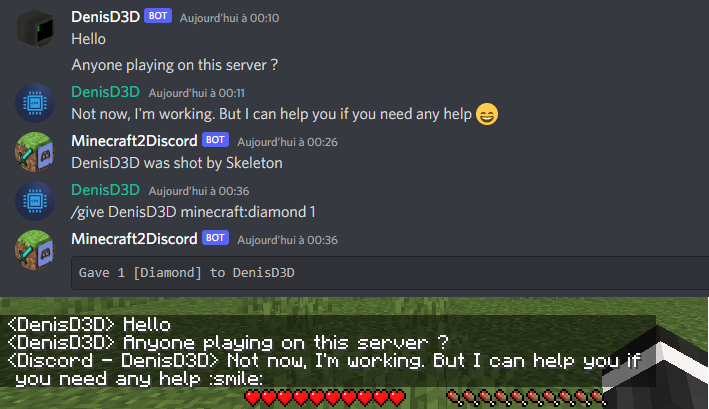
- Send Minecraft chat message to your Discord server
- Send message in your Discord server to the Minecraft chat
- Send game events message to Discord (player join, player leave, death, etc.)
- Display player's head as profile picture in Discord thanks to webhook mode
- Execute Minecraft commands on Discord
- Customize bot presence (eg: playing at xxx) and channel name / topic
- Provide an invitation link to your Discord server with the /discord command
- Forward the server console to discord (useful for admins)
- Hide player on Discord (useful for admins, integrate with VanishMod)
- Account linking (forced or optional)
- Fully customizable, easy configuration (messages, behavior, etc.)
- Relay others mods announcements
- Works with Emojiful to display emojis ingame
Join the official demo server hosted by MtxServ
- Join the demo discord channel #access-demo
- Start the sever with /start command (server is usually stopped)
- Connect to m2d-demo.denisd3d.fr with minecraft 1.20.2 Vanilla
A quick configuration is mandatory for the mod to work. Steps are described on the wiki: https://github.com/DenisD3D/Mc2Discord/wiki
If you need any help or want new features, you can join the Discord support server
You can also watch the video tutorial:

Minecraft 1.21.1, 1.21.11, 26.2 and 26.3 are built from a single codebase for Fabric, Forge and NeoForge with Stonecutter.
| Path | Content |
|---|---|
mc2discord-core/ |
Discord side of the mod, independent of Minecraft |
src/ |
Minecraft side of the mod, for every version and loader |
build.<loader>.gradle.kts |
Build script of each loader |
buildSrc/ |
Build logic shared by the loaders |
stonecutter.properties.toml |
Dependencies versions of each Minecraft version and loader |
settings.gradle.kts |
List of the Minecraft versions and loaders |
Each version and loader is a Gradle project named <minecraft>-<loader>:
./gradlew build                 # Build everything
./gradlew :26.3-neoforge:build  # Build one target, the jar is in versions/26.3-neoforge/build/libs
./gradlew :26.3-fabric:runServer
The code in src/ differs between targets with Stonecutter comments:
//? if >=1.21.5 {
return new ClickEvent.OpenUrl(URI.create(url));
//?} else {
/*return new ClickEvent(ClickEvent.Action.OPEN_URL, url);
*///?}
The conditions can be a Minecraft version (>=1.21.5) or a loader (fabric, forge, neoforge). Most of the differences are grouped in VersionCompat.java. Simple renames are declared in stonecutter.gradle.kts: the code always uses the newest name, which is replaced by the old one when building an older version.
Only one target is active (not commented) in src/ at a time, 26.3-fabric by default. To work on another one, run the Set active project to <minecraft>-<loader> Gradle task (or use the Stonecutter IntelliJ plugin), and run Reset active project before committing.
To support a new Minecraft version, add it in settings.gradle.kts and stonecutter.properties.toml, then fix the compilation errors with new conditions.
- Discord (Support): https://discord.gg/rzzd76c
- CurseForge (Download): https://www.curseforge.com/minecraft/mc-mods/mc2discord/
- Modrinth (Download): https://modrinth.com/mod/mc2discord
- Github (Source): https://github.com/DenisD3D/Mc2Discord
- Wiki: https://github.com/DenisD3D/Mc2Discord/wiki
